
So, you’ve created a stunning commercial for your company, and you’re ready to let the world see it. You also understand the importance of advertising. Your video won’t reach new viewers unless you invest in advertising. So, where do you even begin? If you want to get the most out of your video promotion efforts across paid advertising platforms, you need to first develop a good marketing plan that includes setting achievable goals, allocating a budget based on the LTV of your customers, and identifying your primary demographic. Since its inception in 2005, YouTube has been owned by Google. Since then, Google has combined YouTube with its massive trove of advertising and audience data to create a revolutionary service that directly targets the people who are most likely to make a purchase after seeing a video on the site.
Your advertisements will appear on YouTube and/or Google’s Partners network, but they will be created and managed in their entirety within the Google Ads interface (formerly known as Google Adwords). We’ve created a simple, step-by-step instruction that will have your YouTube advertising up and running in no time. To demonstrate how simple it is for even the smallest firm to roll out new advertising, we enlisted the help of one of our actual customers.
Organize Your AdWords Campaign
AdWords video promotion may boost your YouTube channel’s popularity if you know your audience and consistently produce high-quality videos that are useful to that audience. AdWords advertising may give your YouTube channel more momentum and enhance organic growth if the videos deliver great material and the adverts target the proper demographic. Creating an AdWords account is a necessary first step. You can create one for nothing if you don’t already have one. The following step is to establish a connection between your YouTube channel and your AdWords account. Select Linked Accounts, then click YouTube after clicking the wrench-shaped Tools, Billing, and Settings button. Then, finish the procedure by following the on-screen prompts.
Manage Your Ad Groups Inside of Your Campaign
Within a single AdWords campaign, you may set up many ad groups. Multiple videos from YouTube that share a common theme can be grouped together in one ad. Ad group organisation in the context of a larger campaign is key to grasping the strategy discussed in this piece and selecting appropriate settings to advertise your YouTube videos. You want all of your ad groups to focus on the same keywords or playlists on YouTube (called a placement because you place the ad on a specific YouTube channel or video). Whoever is searching for that particular phrase or subscribed to that particular YouTube channel will be the one to see your video.
Build up your campaign’s individual ad groups.
Below the campaign, information is where you’ll find the Create Your Ad Group section, where you’ll make your first ad group. Name your group something descriptive enough to tell it apart from the other ad groups in your campaign. You may then enter your maximum CPV bid and any adjustments for trending videos in the Bidding section. Setting a maximum CPV bid is the most you are willing to spend per click on your ad. In the Maximum CPV Bid section, you may choose the highest amount you are willing to spend per view. In this case, if you have a monthly budget of $200 and 1,000 people click on your ad and view your video, you will pay no more than $15 per day (or $100 per month). You may boost the likelihood that your video ad will appear on YouTube’s most popular videos or channels by adjusting your bidding strategy. Type in the percentage increase or decrease you want to make to your highest possible CPV bid. Therefore, if your ad is displays popular material on YouTube and someone clicks the ad, you will pay $0.11, as the maximum CPV bid is $0.10 and your bid adjustment for popular videos is 10%.
Draft Up That Video Ad!
Advertisement videos may be added once campaign and ad group parameters have been established. Be mindful of the AdWords advertising policies when you design ads.
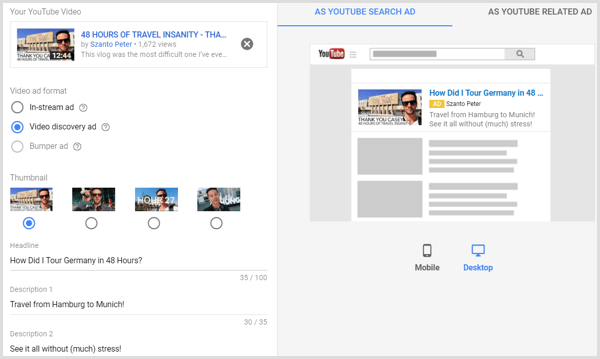
Click the “Create an Ad” button at the bottom of the page to get started. You can select an ad format (in-stream or discovery) and then paste the YouTube video’s link. (The approach discussed here has nothing to do with bumper ads.) Select a stock image to get featured in your ad. The video thumbnail you created may be selected as an option. The next step is to give your ad a name and a brief description. While you are filling out this form, you will be able to switch between a mobile and desktop preview of the ad on the right. You should keep the watch page set as the default landing page for the ad. Finally, label your advertisement.
AdWords Analytics: Critical Metrics for Evaluating the Success of Video Ads
As was said at the beginning of the piece, success is maximised with precise targeting. Check the AdWords dashboard’s ad analytics, paying close attention to the following, to track how well your advertisements are doing:
Views
Percentage of Views At least 75% of viewers
Attending a Timed-Involvement Watch (Likes and Comments)